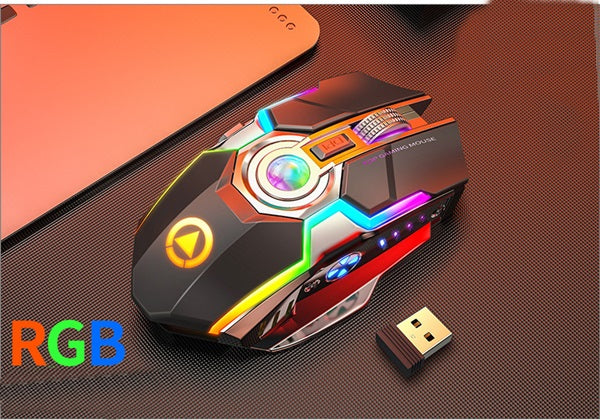
| Specification | Details |
|---|---|
| Connection Type | 2.4GHz Wireless |
| Battery | Rechargeable Lithium Battery |
| RGB Lighting | Customizable Multi-Color LED |
| Button Type | Silent Click Technology |
| DPI Range | Adjustable Sensitivity |
| Design | Ergonomic Right-Handed |
| Compatibility | Windows, Mac, Linux |
| Weight | 180g (Lightweight Design) |
1
/
of
6
Worldwide Ship
Sarah Express
RGB Gaming Mouse Wireless Rechargeable Silent
Wireless RGB Gaming Mouse Rechargeable Silent Click Ergonomic
Regular price
$28.75 USD
Regular price
Sale price
$28.75 USD
Shipping calculated at checkout.
Quantity
Couldn't load pickup availability
📋 Product Specifications
✨ Product Description
Elevate Your Gaming Experience
Transform your gaming setup with this premium wireless RGB gaming mouse that combines cutting-edge technology with ergonomic comfort. Designed for serious gamers and professionals who demand precision, reliability, and style.
Why Choose This Gaming Mouse?
- Silent Click Technology: Enjoy whisper-quiet operation perfect for late-night gaming sessions or shared workspaces without disturbing others
- Stunning RGB Lighting: Customize your gaming aesthetic with vibrant, multi-color LED effects that sync with your setup
- Rechargeable Convenience: Say goodbye to disposable batteries with built-in rechargeable lithium battery for extended gaming marathons
- Wireless Freedom: Experience lag-free 2.4GHz wireless connectivity with reliable performance up to 10 meters
- Ergonomic Comfort: Contoured design reduces hand fatigue during extended gaming sessions, providing natural grip and support
- Precision Control: Adjustable DPI settings allow you to switch between high-speed movements and pixel-perfect accuracy instantly
- Universal Compatibility: Works seamlessly with Windows, Mac, and Linux systems - plug and play simplicity
Perfect For:
Whether you're conquering virtual battlefields, editing photos, working on spreadsheets, or browsing the web, this versatile gaming mouse delivers exceptional performance across all tasks. The silent clicks make it ideal for office environments, while the RGB lighting and gaming-grade precision satisfy competitive gamers.
Experience the difference of premium wireless gaming technology that doesn't compromise on performance, comfort, or style.
🚚 Shipping Information
Delivery Details
Processing Time: 1-3 business days
Shipping Time: 7-15 business days
Shipping From: International Warehouse
We Ship To 42 Countries Worldwide:
🇪🇺 Europe (28 countries): Austria, Belgium, Bulgaria, Croatia, Cyprus, Czech Republic, Denmark, Estonia, Finland, France, Germany, Greece, Hungary, Ireland, Italy, Latvia, Lithuania, Luxembourg, Malta, Netherlands, Poland, Portugal, Romania, Slovakia, Slovenia, Spain, Sweden, United Kingdom
🌏 Asia & Middle East (7 countries): Israel, Japan, Pakistan, Qatar, Saudi Arabia, Singapore, United Arab Emirates
🌎 Americas (3 countries): Brazil, Canada, Mexico
🌏 Oceania (2 countries): Australia, New Zealand
🌍 Africa (2 countries): Morocco, Nigeria
⚠️ Important Notice: This item ships from overseas. All international sales are FINAL SALE - no returns or exchanges. Please select your specifications carefully before purchasing.
📦 All orders are carefully packaged to ensure safe delivery
📧 Tracking information provided once shipped
🌍 Browse our Worldwide Shipping Collection
💡 Usage & Care Instructions
Getting Started:
- Remove the mouse from packaging and charge fully before first use (2-3 hours)
- Insert the USB wireless receiver into your computer's USB port
- Turn on the mouse using the power switch on the bottom
- The mouse will automatically connect - no software installation required
- Adjust DPI settings using the dedicated button for your preferred sensitivity
Charging Instructions:
- Connect the included USB charging cable to the mouse and a power source
- LED indicator will show charging status (typically red while charging, green when full)
- Full charge provides up to 30 days of normal use
- Can be used while charging for uninterrupted gaming
Maintenance Tips:
- Clean the mouse surface regularly with a soft, dry cloth
- Avoid using harsh chemicals or abrasive materials
- Store in a cool, dry place when not in use
- Keep the USB receiver in a safe place to prevent loss
Troubleshooting:
- Mouse not connecting: Ensure the USB receiver is properly inserted and the mouse is powered on
- Cursor movement issues: Try using the mouse on a mouse pad or different surface
- Battery draining quickly: Turn off RGB lighting when not needed to extend battery life
"You can't buy class, but you can buy quality."
— Sarah Express
Share