| Feature | 4K Model | 2K Model | 1080P Model |
|---|---|---|---|
| Model | PGR-008 | ||
| Video Resolution | 3840×2160 | 2592×1944 | 1920×1280 |
| Frame Rate | 30 FPS | ||
| Sensor Type | CCD/CMOS | ||
| Video Encoding | M-JPEG | ||
| Audio | Dual Stereo Microphone (192kbs) | ||
| Focus Mode | Manually Adjustable Auto-Focus | ||
| LED Fill Light | 4Pcs Adjustable Soft Ring Light | ||
| Material | Premium ABS + Acrylic | ||
| Installation | Horizontal Mount | ||
| Driver | Plug & Play (Driver-Free) | ||
| Compatibility | Windows 2000/XP/7/8/10, macOS | ||
Free Ship
Worldwide Ship
Sarah Express
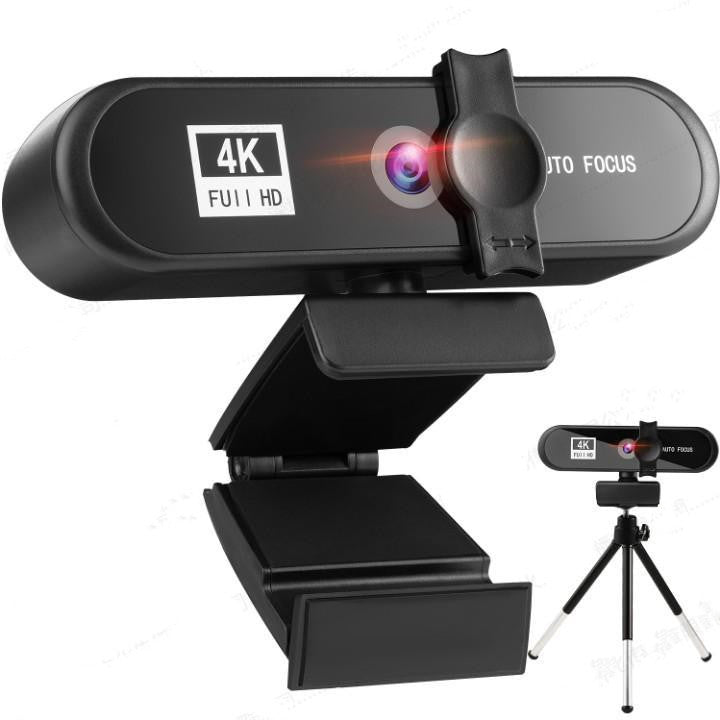
4K Webcam with Microphone & LED Ring Light
4K Webcam with Microphone - Auto Focus USB Computer Camera with LED Ring Light
Regular price
$33.03 USD
Regular price
Sale price
$33.03 USD
Shipping calculated at checkout.
Quantity
Couldn't load pickup availability
Transform your video calls, streaming, and content creation with crystal-clear 4K resolution. This professional-grade USB webcam delivers stunning image quality with auto-focus technology, dual stereo microphones, and adjustable LED ring lighting—everything you need for flawless video communication and content production.
📋 Product Specifications & Technical Details
✨ Why Choose This Webcam?
Professional Video Quality: Experience cinema-grade clarity with up to 4K resolution at 30fps. Whether you're hosting virtual meetings, streaming on Twitch, creating YouTube content, or teaching online classes, your audience will see every detail in stunning high definition.
Crystal-Clear Audio: Built-in dual stereo omnidirectional microphones capture your voice with exceptional clarity from every angle, eliminating the need for external audio equipment. Perfect for podcasting, video conferencing, and content creation.
Perfect Lighting Every Time: Four adjustable LED ring lights provide soft, flattering illumination that eliminates shadows and ensures you always look your best—even in low-light conditions. Adjust brightness to match your environment.
Smart Auto-Focus Technology: Advanced auto-focus keeps you sharp and clear whether you're sitting still or moving around. The manually adjustable focal length gives you complete control over your image depth and clarity.
True Plug & Play: No complicated setup or driver installation required. Simply connect the USB cable to your computer or laptop, and you're ready to go in seconds. Compatible with all major video platforms including Zoom, Skype, Teams, OBS, and more.
Versatile Mounting Options: Includes a desktop tripod for stable positioning on any surface. The horizontal mounting design works perfectly with laptops, monitors, and standalone setups.
🎯 Perfect For
- Remote Work & Video Conferencing: Look professional in every Zoom, Teams, or Google Meet call
- Content Creation: YouTube videos, Twitch streaming, TikTok content, and podcasting
- Online Education: Distance learning, virtual classrooms, and tutorial recording
- Telemedicine: Remote healthcare consultations with clear video quality
- Live Streaming: Gaming streams, webinars, and live broadcasts
- Video Recording: Vlogs, product reviews, and professional presentations
📦 What's Included
- 1× 4K USB Webcam with Auto-Focus
- 1× Desktop Tripod Stand
- 1× User Manual with Setup Instructions
💡 Pro Tip: Position the webcam at eye level and adjust the LED ring light to medium brightness for the most natural, professional appearance on camera.
🚚 Shipping Information
📍 Delivery Timeline: 7-15 business days
🌍 We Ship To:
🇪🇺 Europe (28 countries): Austria 🇦🇹, Belgium 🇧🇪, Bulgaria 🇧🇬, Croatia 🇭🇷, Cyprus 🇨🇾, Czech Republic 🇨🇿, Denmark 🇩🇰, Estonia 🇪🇪, Finland 🇫🇮, France 🇫🇷, Germany 🇩🇪, Greece 🇬🇷, Hungary 🇭🇺, Ireland 🇮🇪, Italy 🇮🇹, Latvia 🇱🇻, Lithuania 🇱🇹, Luxembourg 🇱🇺, Malta 🇲🇹, Netherlands 🇳🇱, Poland 🇵🇱, Portugal 🇵🇹, Romania 🇷🇴, Slovakia 🇸🇰, Slovenia 🇸🇮, Spain 🇪🇸, Sweden 🇸🇪, United Kingdom 🇬🇧
🌏 Asia & Middle East (7 countries): Israel 🇮🇱, Japan 🇯🇵, Pakistan 🇵🇰, Qatar 🇶🇦, Saudi Arabia 🇸🇦, Singapore 🇸🇬, United Arab Emirates 🇦🇪
🌎 Americas (4 countries): United States 🇺🇸, Brazil 🇧🇷, Canada 🇨🇦, Mexico 🇲🇽
🌏 Oceania (2 countries): Australia 🇦🇺, New Zealand 🇳🇿
🌍 Africa (2 countries): Morocco 🇲🇦, Nigeria 🇳🇬
💻 Easy Setup Guide
For Windows PC:
- Connect the webcam to an available USB port on your computer or laptop
- Windows will automatically detect and install the device (look for notification in bottom-right corner)
- If no notification appears, open Device Manager → Image Devices to verify USB device is recognized
- Open your preferred video application (Zoom, Skype, Teams, etc.) and select the webcam from video settings
- Adjust LED ring light brightness and focus as needed
For Mac:
- Plug the webcam into your Mac's USB port
- macOS will automatically install the webcam—no additional software needed
- To verify installation: Click Apple menu → About This Mac → System Report → USB section
- Look for 'USB Live Camera' in the connected devices list
- Launch your video app and select the webcam from video input options
🖼️ Product Image Gallery (5 Images)


You can't buy class, but you can buy quality.
Sarah Express